
7-Jan 2025 | Tracking Training Intensity & Set Modifiers

Version 2.1.4
To hit your big goals, you need to know exactly how you’re performing in every session. We’ve beefed up our workout logs to give you the granular control you’ve been asking for. You can now track more dimensions and modifiers for every single set, making your data sharper than ever.
Better data means better insights, helping you plan your next win with total confidence.
I am excited to introduce the following new features:
-
RPE & RIR support: You can now indicate how hard you felt a set was and use this to program your training.
-
Previous set: The last available set will be displayed right below your current set, so you can decide whether to match or even up the intensity.
-
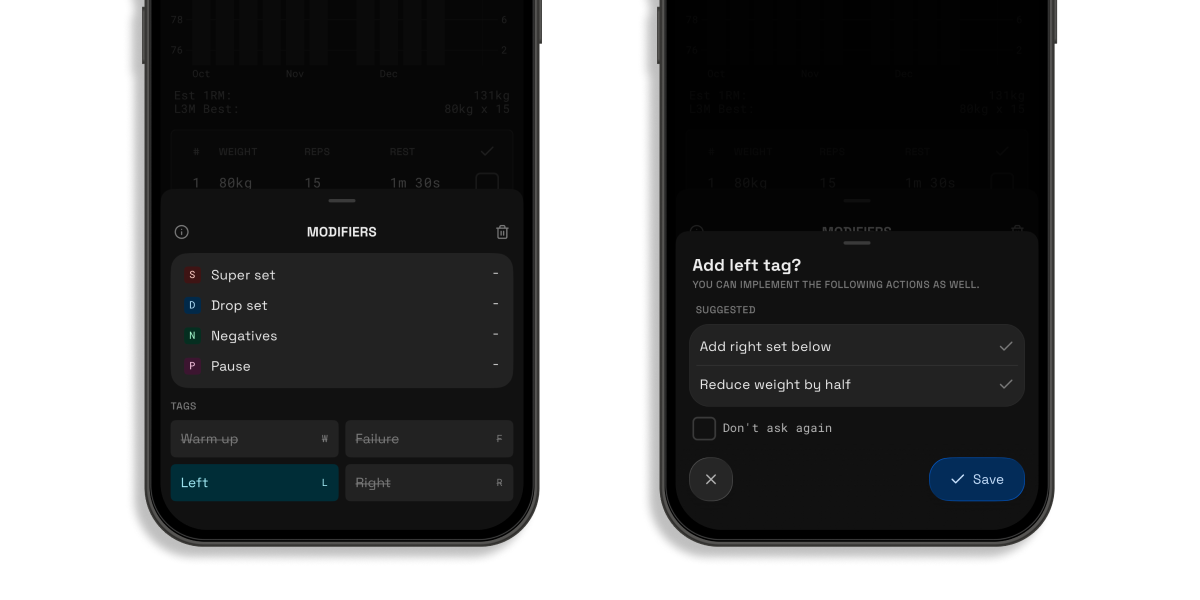
New set modifier tags: In addition to warm ups, you can now tag a set with failure & left/right tags with the support for automated actions.
-
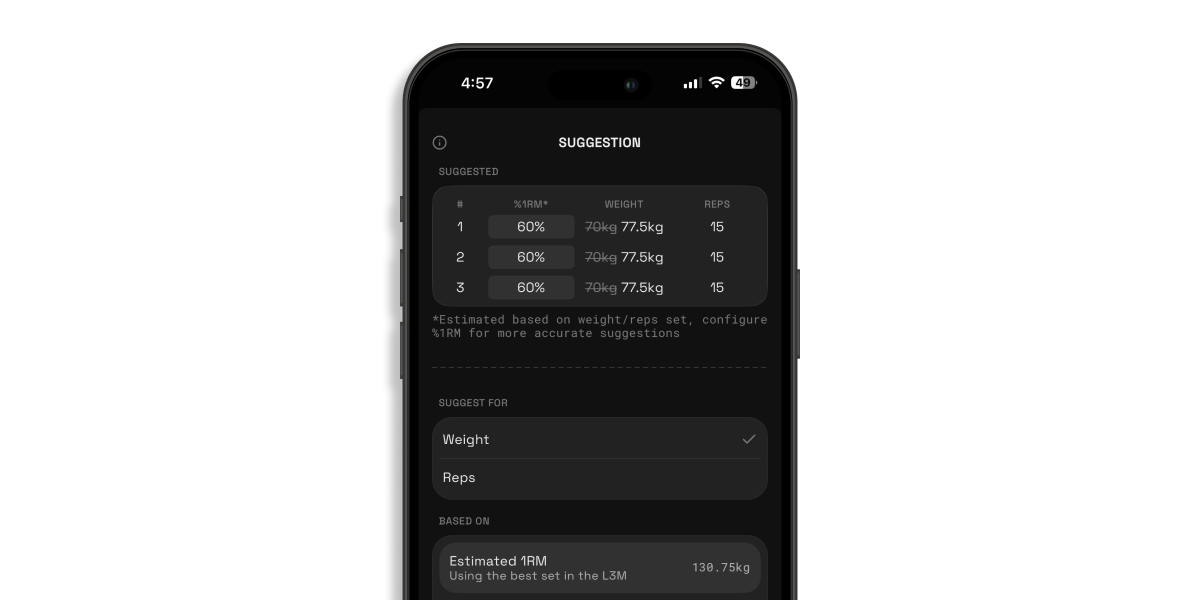
Weight & rep suggestions: Based on your estimated or configured 1RM, an appropriate weight will be suggested for the reps set, vice versa.
New Features
💪 Train Smarter, Not Just Harder: RPE & RIR Support
We all have those days where the weights feel like feathers, and others where a warmup feels like a world record attempt. To help you navigate those ups and downs, we’ve added support for RPE (Rate of Perceived Exertion) and RIR (Reps in Reserve). It’s all about training at the perfect intensity for today, ensuring you make progress without hitting a wall.
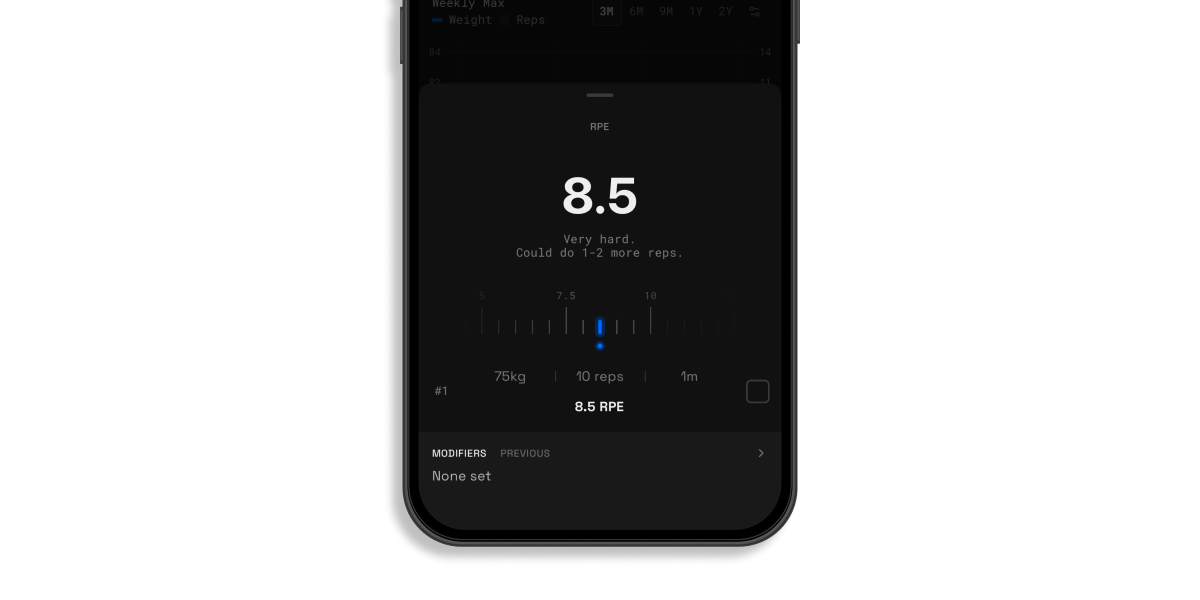
Here’s how you can use these new tools to level up your logging:
-
Track the "Feel": After finishing a set, log your RPE (on a scale of 5-10) or RIR (how many more reps you could have done) to capture the true difficulty of the work.
-
Auto-Adjust Your Effort: Use your previous RPE/RIR scores to decide if you should add more weight or pull back slightly based on how your body is recovering.
By focusing on how a lift actually feels rather than just the number on the bar, you'll stay consistent and injury-free. Remember: progress isn't a straight line, so listen to your body and let the data guide the way!
☝️Quick tip: If you want to use RPE/RIR for all your exercises, you can configure the default dimensions in the Settings > Training > Workout. For previously custom exercises, you can configure the dimensions to follow the default ones set.
⚡️ Quicker references with the Previous Set label
No more jumping back and forth between screens to remember where you left off. Your last completed set now appears directly under your current one, making it easier than ever to match your previous rep count or push for that extra bit of weight.
You can also select on the previous set label to view all the sets from the previous workout to get a clearer picture of what you did previously.
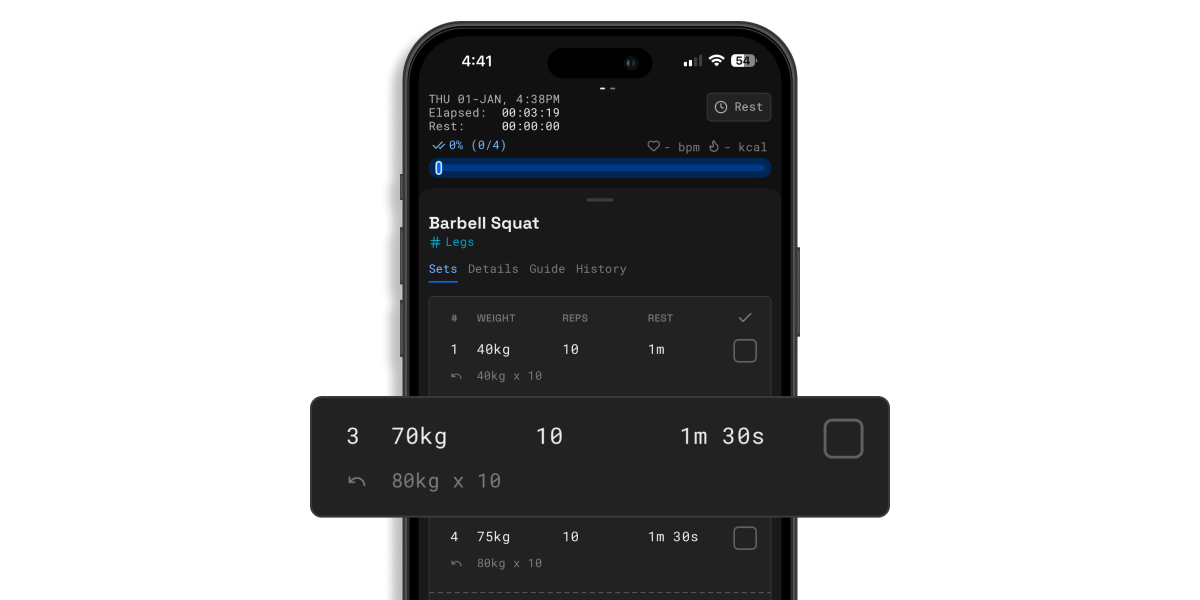
☝️Quick tip: You can use this in conjunction with the RPE/RIR dimensions to select an appropriate weight to train with. You can also exclude certain dimensions like the rest time from being displayed in the Settings > Training > Workout, to keep it concise to what you need.
🏷️ Track every detail with Modifier Tags
Progress isn’t just about the weight on the bar; it’s about the context of the lift. We’ve added new Modifier Tags to help you categorize your sets with a single tap, giving you a crystal-clear picture of your performance.
-
Beyond the Warm-up: You can now tag sets as Failure or Left/Right for unilateral exercises. No more guessing which leg you started with or how hard that last rep really was.
-
Smarter Unilateral Tracking: Tagging sets as Left or Right makes it easy to track imbalances and ensure you're giving both sides the attention they deserve.
-
Automated Actions: These tags do more than just look pretty. Want to mark a set for just your left side? The app can automatically automatically reduce the weight by half and add another corresponding set for your right side!
Small tweaks lead to big gains. Give the new tags a spin in your next workout! Simply select the index of the set to access the modifier selector.
☝️Quick Tip: You can also configure to exclude warm up & failed sets from any calculation in the Settings > Training > Modifiers. There is also an option to highlight failed sets in red.
🏋️♀️ Weight & rep suggestions
Stop doing mental gymnastics between sets. Based on your 1RM, we’ll now suggest exactly how much weight you should lift for your target reps (and vice versa).
-
Automatic Calculations: No more guessing your load; we handle the math based on your current strength.
-
Dynamic Adjustments: If you change your reps, we’ll suggest a new weight instantly to keep the intensity right where it needs to be.
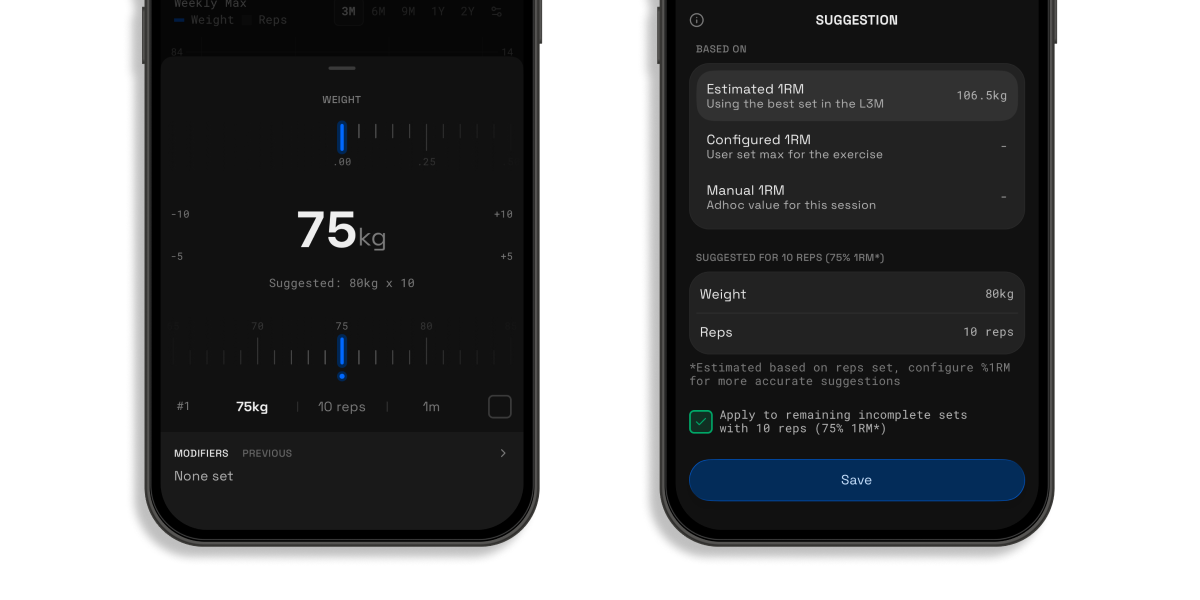
You can also quickly configure all your sets at once based on the %1RM via the exercise options.
🤖 Other Fixes & Improvements
New & Improved
-
Decimal support for reps and rep ranges to accurately represent half reps
-
Decimal support for %1RM for finer-grained load control
-
Set index subscripts when modifier tags are applied (e.g. warm-up sets now display as W₁ instead of just W)
-
Configurable default exercise dimensions, allowing %1RM and RPE/RIR to be applied globally
-
Custom 1RM per exercise, used directly for smarter set suggestions
-
Redesigned toast notifications with Liquid Glass support
-
Modifier inheritance: new sets automatically copy modifiers from the previous set
-
Removed muscle tags for non-StrongSplit sessions to reduce visual noise
Bug Fixes
-
Fixed an issue where adding a new set would incorrectly fall back to default rest time when the previous set had 0s rest
-
Prevent watch app from abruptly ending replacing active workout with another routine
-
Resolved crashes caused by legacy data migrations
-
Fixed a crash triggered by rest completion toasts when the next set’s exercise was invalid or deleted
-
Prevent disabled activity sources from contributing to metrics to the activities tab
-
Fixed exercise input not collapsing correctly after dismissing the keyboard
-
Resolved crashes when selecting health metrics, and fixed missing bar indicators for users in certain time zones
-
Fixed an issue where adding new exercise dimensions during an active workout did not populate default values, causing edit errors
✈️ Up next
In the next update, the focus will still be on expanding the workout capabilities, some key features include but are not limited to the following:
-
Notes support
-
Number pad input
-
Support to add set above selected set
Feel free to drop a suggestion or vote on the feedback board [link]. Let me know what else you really need!
❤️ Rate Strongsplit
If you enjoy using the app, do help to leave a review on the App Store [link], it would help tremendously. Thank you!