
16-Jan 2026 | Pinned Notes & Numpad Support

Version 2.1.5
As a follow up to the previous update, more controls have been added to allow you to be able to log more information about your workout in the most efficient way.
Whether you want to jot down how a specific lift felt, write some training cues, change your input method on the fly, or decide exactly where a new set belongs, these changes are designed to make the app work for you, not the other way around.
I am excited to introduce the following new features:
-
Pinned Notes: Add context to your training and pin important notes for quick reference
-
Number pad: New input option to edit sets, along side the existing number wheel for bigger changes
-
Mirror set changes: You can now control how changes to a set will be reflected for remaining incomplete sets
-
Add set position: Choose if you want to add a set above/below a selected set instead of just at the bottom
New Features
1. Pinned Notes 📝
You can now add unlimited notes to any exercise, routine, or session, making it easier to track the little details that lead to big gains. Instead of working around rigid templates, you now have the freedom to map out your sessions exactly how you see fit.
-
Pin your best cues: Pin specific notes to the top of an exercise or routine. Use this for quick setup reminders, like cable height or bench angles, so you never have to guess your settings again.
-
Routine-specific notes: Training the same exercise differently in another program? You can now pin a note to an exercise for one specific routine only.
-
Capture every detail: Beyond just numbers, use this space to jot down how a lift felt or any training cues that helped your form.
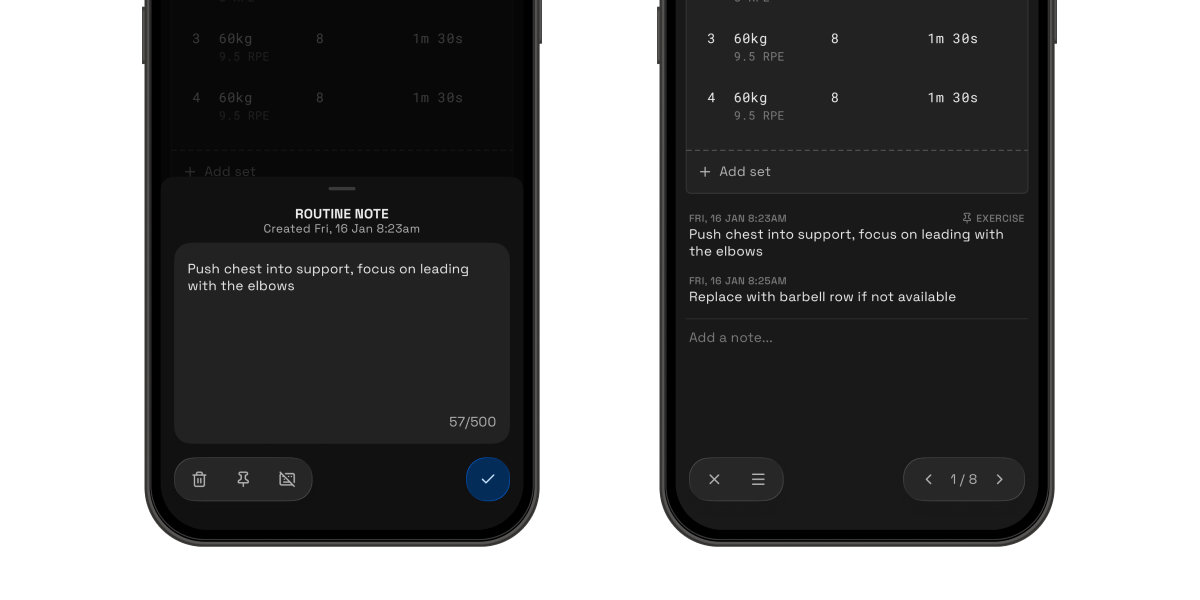
Every lifter trains differently, and these flexible notes bridge the gap between our data tracking and your unique style. Whether it's a specific seat setting or a mental "click" during a set, you now have a dedicated space to record it.
You can also utilize the notes to keep track of changes you had made to a routine, or even a workout session when you had to swap an exercise because the equipment was being used by someone else.
This might seem like a small feature, but this newfound flexibility will let you log anything that the system is unable to.
2. Number Pad ⌨️
One of the most common feedback that I always get is that the number wheel selector can get cumbersome to use, especially when making large changes.
Whilst the wheel selector does have it's advantages such as handling minute changes, data validation and the haptic feedback, I do admit that there are some flaws, especially for making large changes.
As such, I am happy to introduce the number pad selector that has been optimized for efficient workout logging, and it's integration with the existing wheel selector.
-
Built for Speed: Inputting large weight jumps is now instant, keeping your rest periods focused on recovery, not scrolling.
-
Highly intuitive: Just enter your input and it will be automatically formatted. Like how "130" would be formatted into 1m 30s for time-based inputs. The selection is even automatically highlighted, so you don't need to clear your existing input.
-
Your Choice: Everyone works out differently. You now have a direct, familiar way to punch in your data alongside the existing wheel.
If you're on the wheel selector, you can quickly access the number pad for larger changes by simply selecting on the number.
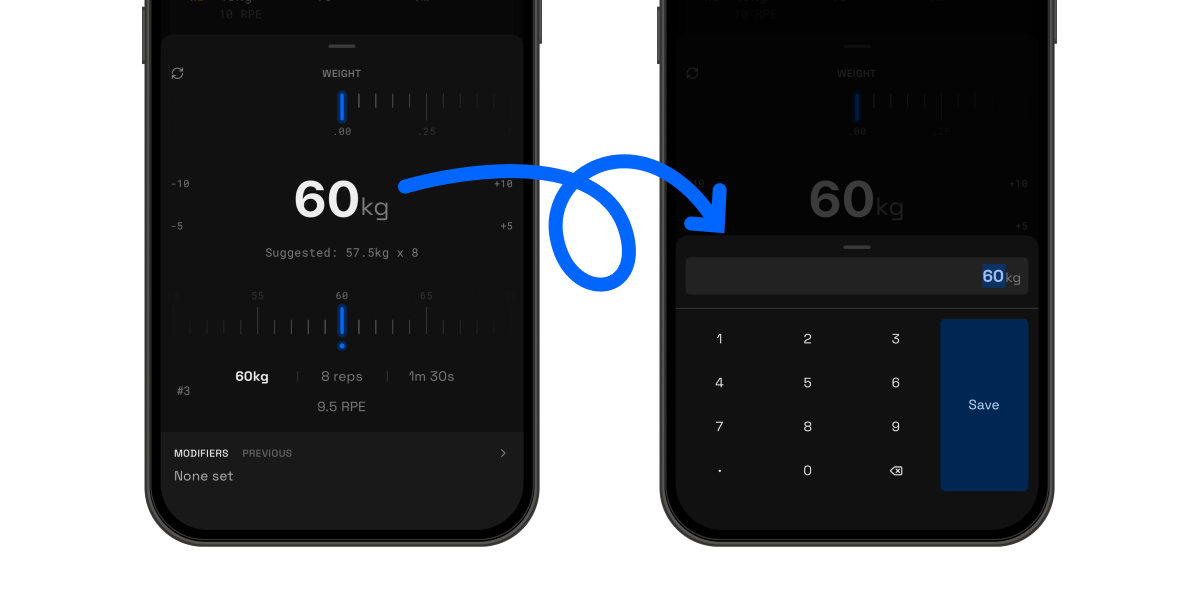
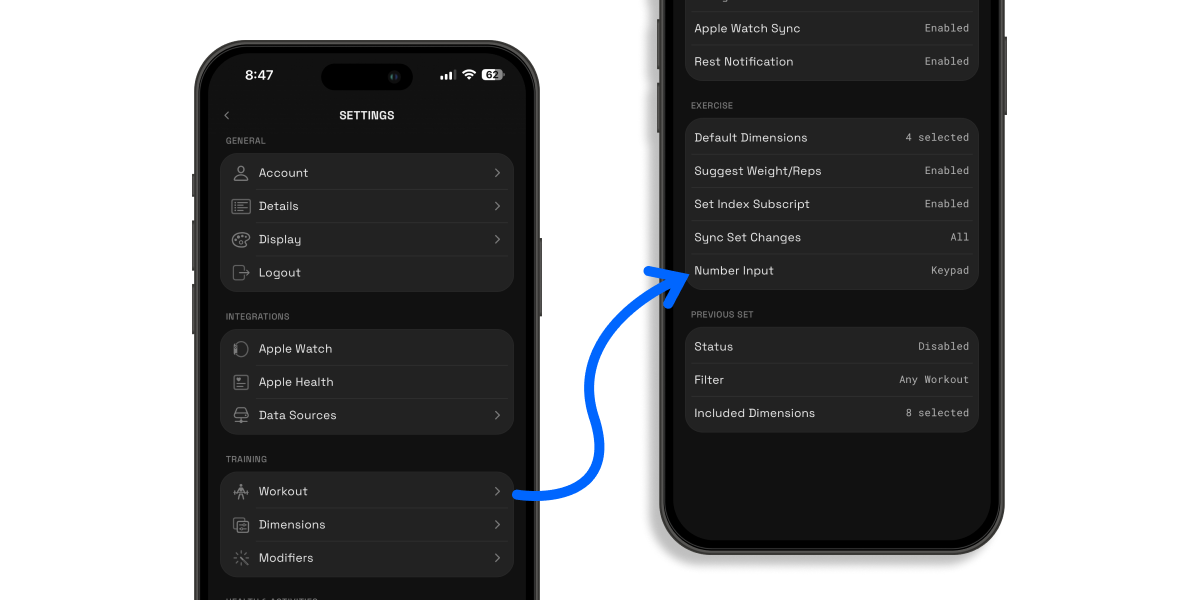
☝️Quick Tip: You can switch to the number pad as your default selector in the settings via Training > Workout > Exercise > Number input. An entry point has also been added during an active workout via the options in the footer for easier configurations.
3. Mirror Set Changes 🔄
Currently, any edits to a set will be synced with all remaining incomplete sets. But sometimes, you only want to edit the current set without affect the rest, or maybe only sync the changes with selected sets. This update fixes that by giving you more control over how your changes sync across your sets.
Now, when you edit a set, you’ll see three smart options to help you save time:
-
This set only: Perfect for those one-off adjustments or when you're doing a pyramid set and only want to change your current weight.
-
All remaining sets: Made a big jump in weight? Use this to instantly update every set left in that exercise with a single tap. No more repetitive typing.
-
Matching remaining sets: This is the "smart" one. It only updates sets that currently match the value you’re changing. For example, if sets 2 and 3 are both 100kg but set 4 is a back-off set at 80kg, changing set 2 will automatically update set 3 but leave your drop set exactly where it is.
You can quickly access the sync options when editing your sets in both the number wheel and pad as shown below.
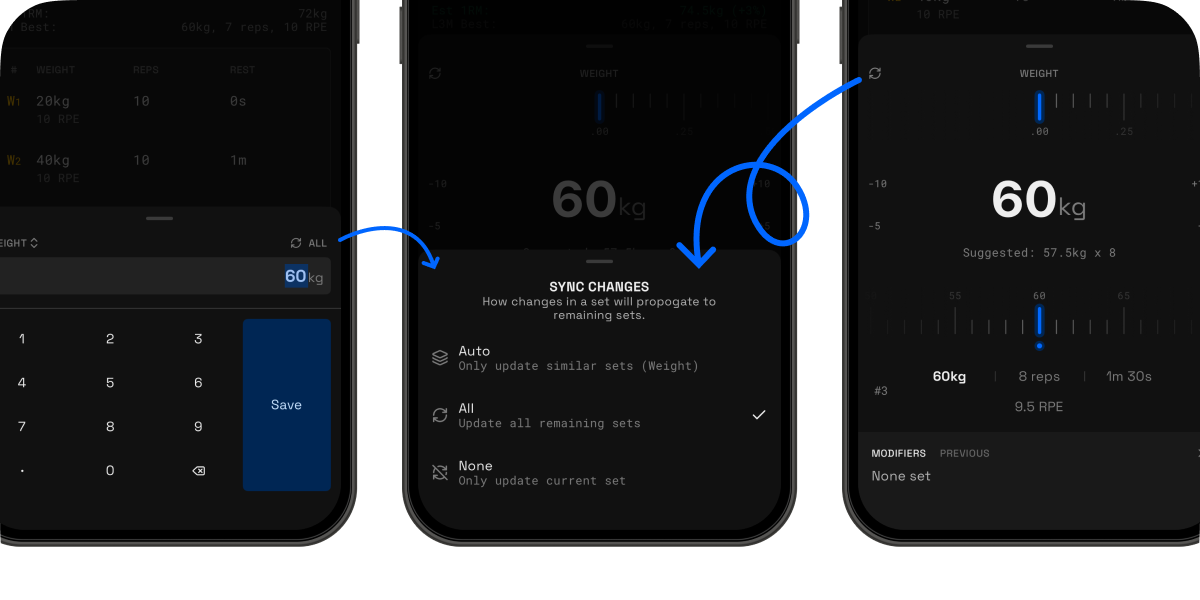
Training should be the hard part, tracking it should be easy. Give these sync options a try during your next session and spend more time lifting and less time tapping!
4. Add Set Position 📍
Sometimes you’re halfway through a workout and realized you forgot a warm-up set, or you want to squeeze in another set right in the middle of your routine. Previously, adding a new set always sent it to the bottom of the list, forcing you to edit all your sets. Not exactly ideal when you’re mid-pump!
I've made things much more flexible. Now, you can add a set exactly where you need it. Simply swipe right on any existing set, and you’ll see the option to insert a new one either ABOVE or BELOW it.
Why you’ll love it:
-
Stay organized: Keep your sets in the perfect order without the extra taps.
-
Save time: No more manual editing to "downshift" the existing sets
-
Flexibility: Adjust your workout on the fly as your energy levels change.
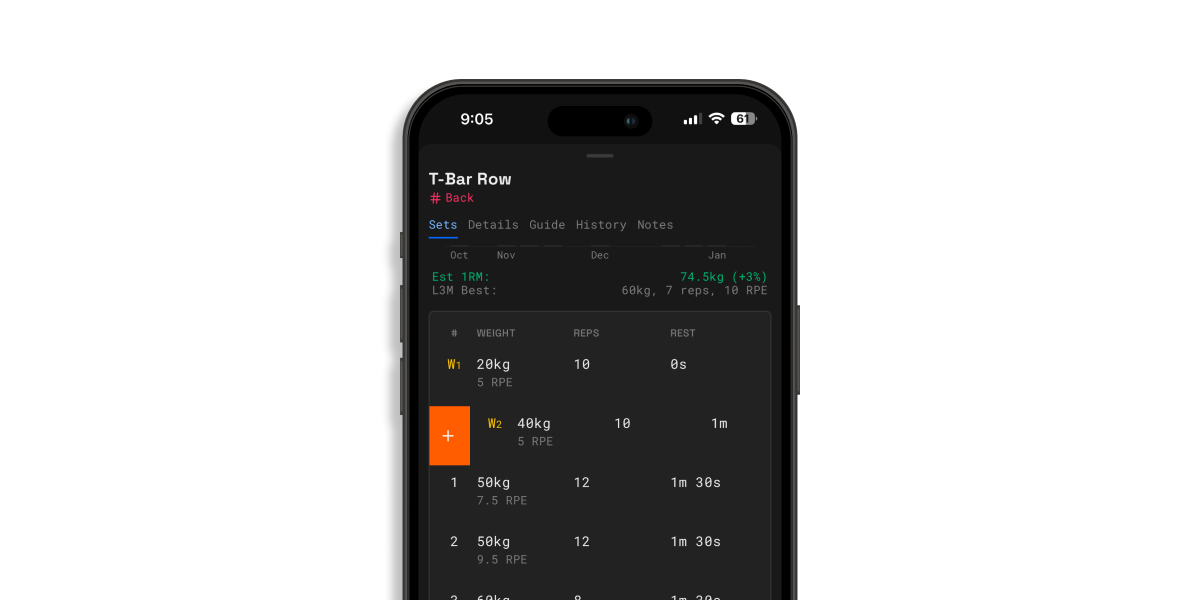
It’s a simple tweak that makes a big difference in keeping your workout flow smooth and focused. Give it a swipe during your next session!
Other Fixes & Improvements
New & Improved
-
Update indicator after the app updates, highlighting what’s new in each release
-
Social links and app version info added to the footer of the settings
-
Refined login screen with clearer messaging and layout
Bug Fixes
-
Fixed crashes when removing or replacing an exercise via the exercise options
-
Fixed an issue where editing all sets from the header didn’t update completed sets correctly
-
Fixed completed sets reverting to old values when edited again
-
Fixed distance-based sets not contributing to total distance in the activity tab
-
Fixed an issue where completed set times weren’t recorded when editing past sessions, causing edited sets to be excluded from metrics
✈️ Up next
In the next update, the focus will still be on expanding the workout capabilities, some key features include but are not limited to the following:
-
Iso-lateral logging
-
Revamped muscle system with support for multiple muscle selection & custom muscles
Feel free to drop a suggestion or vote on the feedback board. Let me know what else you really need!
Feedback board: https://strongsplit.userjot.com/
Thereafter, I'll be focusing on a major revamp of the key screens with better analytics and the watch app, so you can control your workouts on your watch, such as marking a set as complete or receiving notifications on the end of your rest.
❤️ Rate Strongsplit
If you enjoy using the app, do help to leave a review on the App Store, it would help tremendously. Thank you!
App Store: https://apps.apple.com/us/app/strongsplit/id6742700868