
1-Feb 2026 | 💪 Revamped muscles & iso-lateral logging

Version 2.1.6
In this update, these muscle tagging system has been rebuilt from the ground up to give you more control over your data and a clearer picture of your progress. Iso-lateral logging has also been improved with updates to the existing exercise dimensions.
Here is a look at what’s new:
-
A smarter, flexible muscle system: You can now assign multiple muscles to a single exercise, distinguish between primary and secondary targets, and even create your own custom muscle groups. This means your workout analytics are now more accurate, and more utility with smarter exercise replacements by similar muscles targets.
-
"Per Side" logging: No more doing mental math mid-set. You can now log weight and reps for each side independently. This makes tracking things like single-arm rows or lunges more intuitive and ensures your total training volume is tracked accurately.
New Features
1. Revamped muscle system
Previously, you were limited to picking just one primary muscle per exercise. This worked fine for bicep curls, but it didn't tell the whole story for compound movements like deadlifts or bench presses where multiple muscles are working hard at once.
The New Way:
You can now assign multiple primary and secondary muscles to any exercise. This ensures your volume tracking are actually accurate. Plus, if our default list isn't enough, you can now create your own custom muscle groups to track exactly what matters to you.
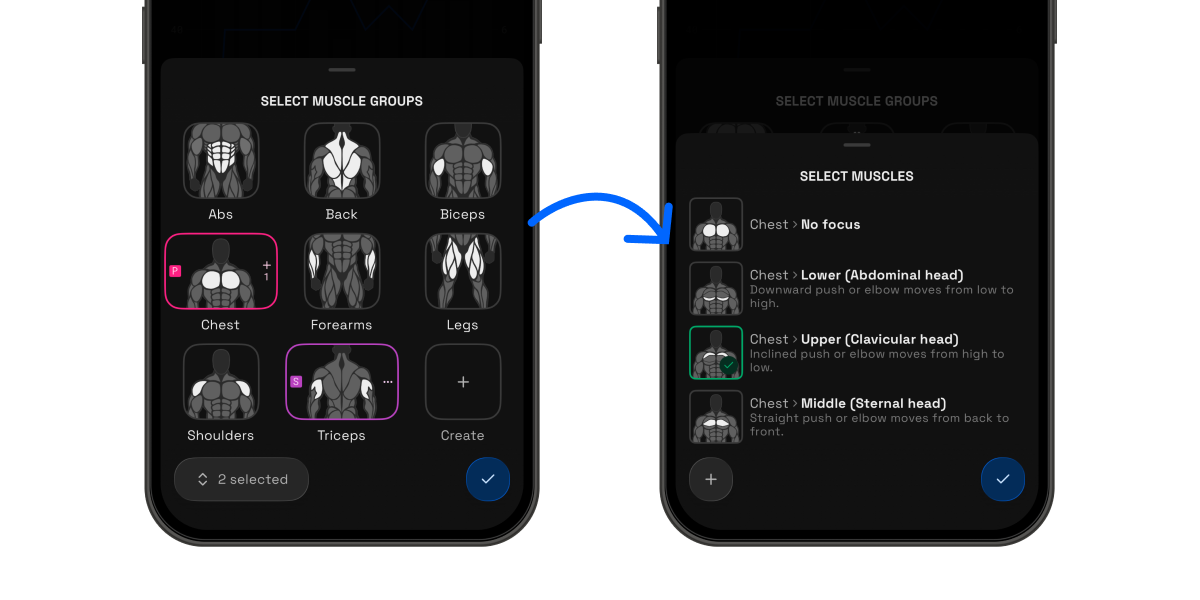
With this revamped system, some new features have been added to make full use this, to give you more insights and utility during your workout.
📊 Real-time Muscle Analytics:
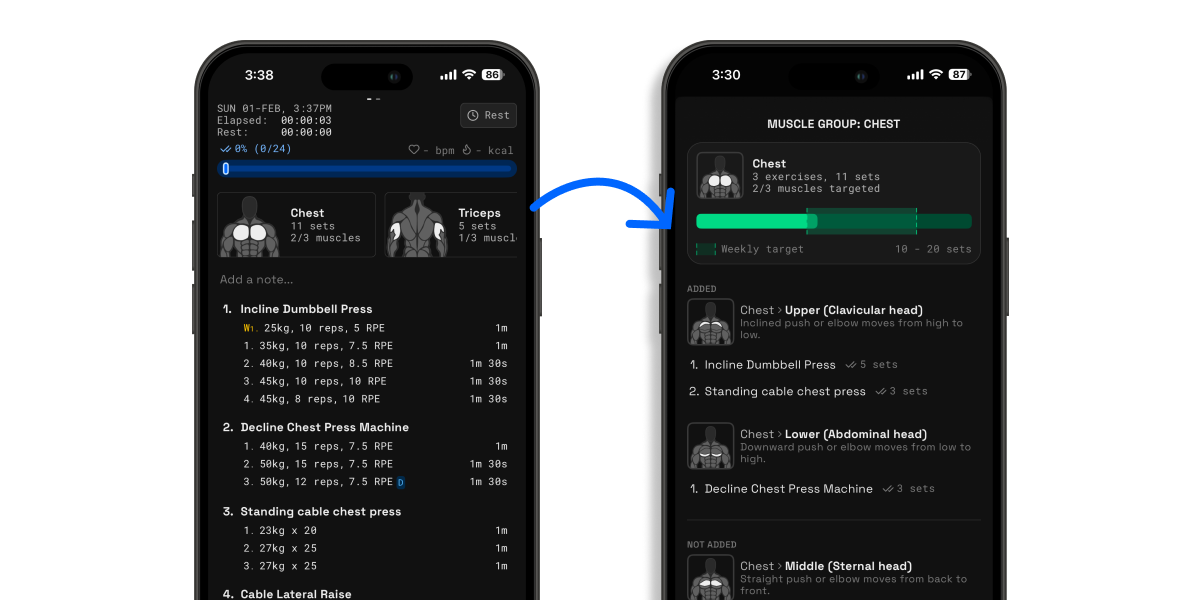
Ever finish a workout and wonder if you're doing enough? We’ve made it easier to adjust your training on the fly with our new intra-workout muscle breakdown.
You can now see exactly how your session is stacking up while you’re still in the gym. No more guessing, just better gains.
-
Hit your weekly targets: Stay on track with your set counts for every muscle group as you train.
-
Total muscle coverage: We’ve broken things down into sub-groups. For example, if you’re hitting chest, we’ll show you if you’ve balanced your work between the upper, middle & lower pecs.
-
Pivot on the fly: If you notice you’re lagging on a specific area, you can add an extra set or swap an exercise before you head to the showers.
💨 Better & Faster Ways to Find Exercise Replacements
When you decide to replace an exercise, we’ll now automatically apply the right filters for you. Instead of scrolling through a massive list, you’ll immediately see similar movements based on the target muscle group & sub-muscle (if configured). It’s all about saving you time so you can get back to your sets.
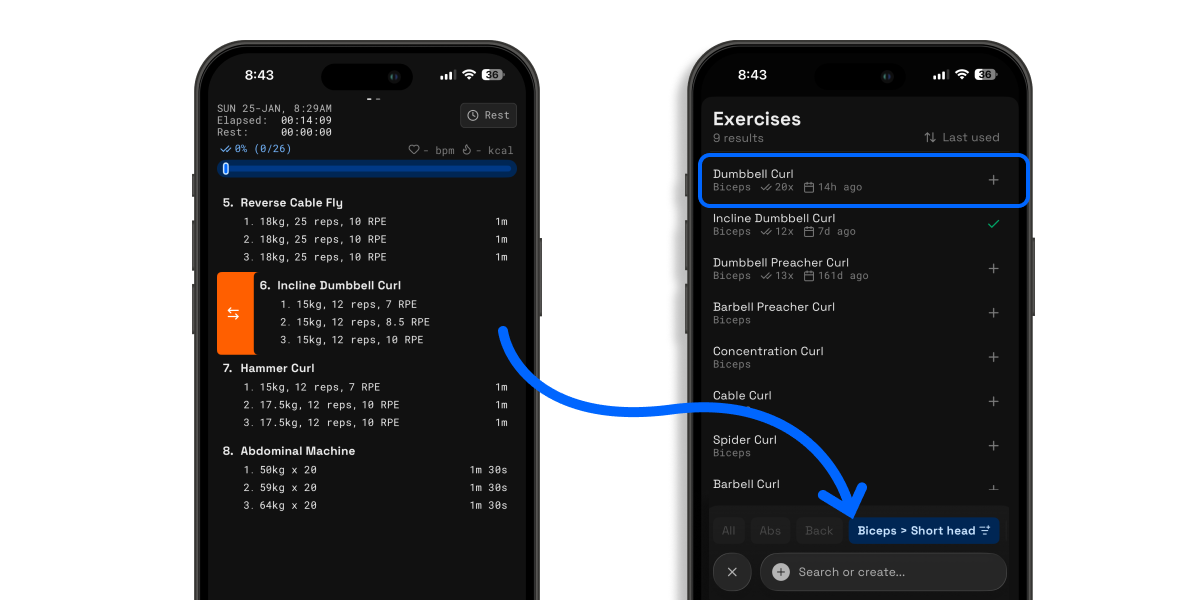
Pair this by sorting your exercises based on the last used time, and you'll get much better recommendations for alternative exercises that you often use.
2. Per side logging
We’ve all been there: you’re mid-workout, staring at a pair of 25lb dumbbells, trying to remember if you’re supposed to log the total weight or just one side. Unless you’re looking for a brain workout along with your biceps, doing "gym math" between sets is the last thing you want to do.
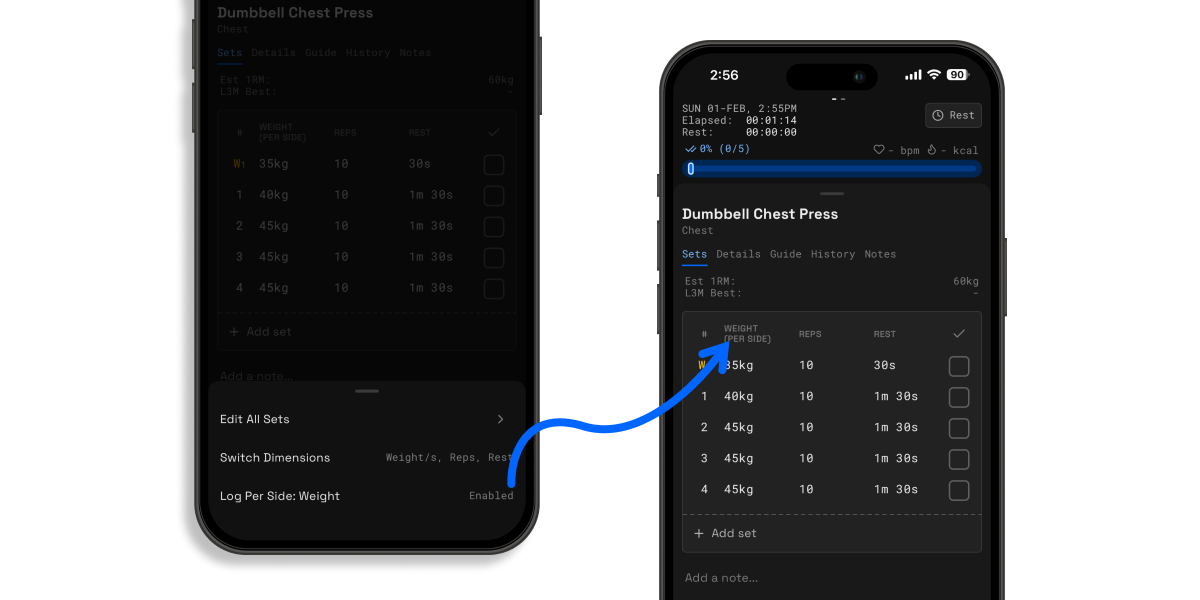
That’s why we’ve introduced Per-Side Logging. Now, you can log exactly what you’re holding or loading onto one side of the bar, and we'll handle the heavy lifting for your volume calculations.
How it makes your workout smoother:
-
Log what you see: If you grab a 30lb dumbbell, just type "30." No more doubling numbers in your head to get your total volume right.
-
Perfect for Iso-Lateral movements: Whether it’s single-arm rows or split squats, your data will now be as accurate as your form.
-
Quick Toggles: You can turn this on or off instantly via the new Set Header. Just tap the header to switch to per-side logging or adjust your exercise dimensions on the fly.
We believe your energy should be spent on your PB, not your arithmetic. Give it a spin during your next lifting session!
Other Fixes & Improvements
Improvements
-
Removed limits on routines in the explore section, plus unrestricted recovery, nutrition, and muscle metrics
-
Smart prompt to update a routine after a workout when changes are detected
-
When saving a workout as a new routine, the last session now correctly links to the newly created routine
-
Automatic rest-time removal action when logging left/right sets and adding a new set
-
Exercise dimension change prompt to apply for all workouts now appear only when editing sessions (not routines)
-
Previous set labels no longer filter by routine when a session isn’t tied to one
Bug Fixes
-
Exercise dimension selector incorrectly showing “Custom” in some default cases
-
Crash when logging out due to cleared user data • Improved error handling for account deletion edge cases
-
Incorrect total set count after replacing an exercise mid-workout
-
Wrong date range when switching frequencies in the activity view
-
Duplicate exercise titles allowed during editing
-
Missing alert when exercise title edits failed
-
Muscle distribution totals not respecting warm-up and failure set exclusions
-
Notes incorrectly enabled for default routines
-
Watch app may not start properly after turning wifi/bluetooth back on after initial workout start attempt
-
RPE/RIR tabs appearing incorrectly when numpad input is enabled
-
Warm-up tag removal not updating rest times for subsequent sets when configured
✈️ Up next
The next update will primarily focus on a revamped version of the Apple Watch app. Some features include but are not limited to the following:
-
Rest timers
-
Updating set status and values
-
Updating exercise selection
Feel free to drop a suggestion or vote on the feedback board (https://strongsplit.userjot.com/). Let me know what else you really need!
❤️ Rate Strongsplit
If you enjoy using the app, do help to leave a review on the App Store, it would help tremendously. Thank you!
App Store: https://apps.apple.com/us/app/strongsplit/id6742700868